
Contents
Overview
The CARS Reference Summary feature has been created to help authors understand publication dependencies between standards. CARS updates to support MCHW authoring introduced WSR, section and clause level referencing. This level of referencing is a lot more susceptible (than document level referencing) to potential alignment issues as documents are reviewed and updated going forward.
Whilst this feature is available to all CARS documents, it will only currently provide data for MCHW (including MMHW) documents.
PLEASE NOTE: This feature collates a lot of data from multiple CARS documents. It therefore can take some time to load. For large documents with many external references (i.e. to other CARS documents), load times of 2-3 minutes are not unexpected.
Back to topAccessing the CARS reference summary
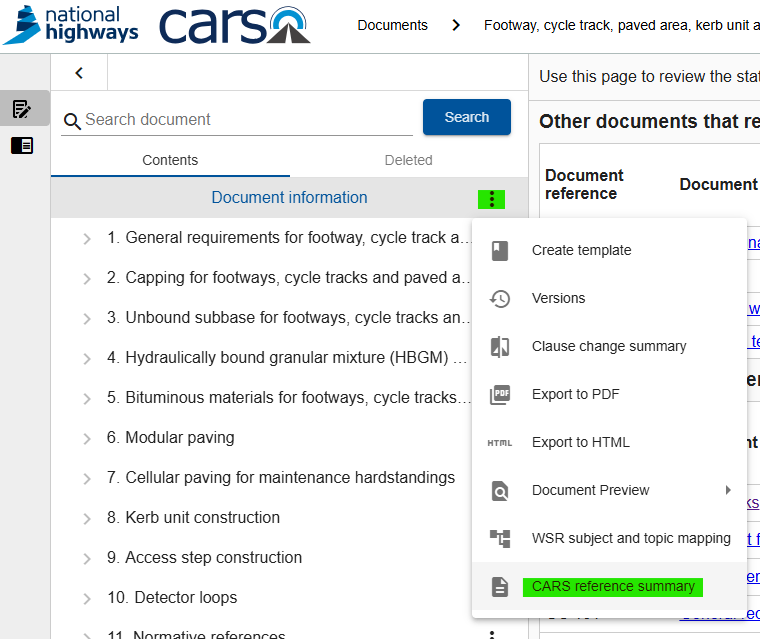
The reference summary is accessed via the Document information page menu. Click on the 3 dots next to the Document information header and then click CARS reference summary.
Opening the references summary automatically triggers a refresh of all references within the document.
Page layout
The reference summary is split into 3 sections:
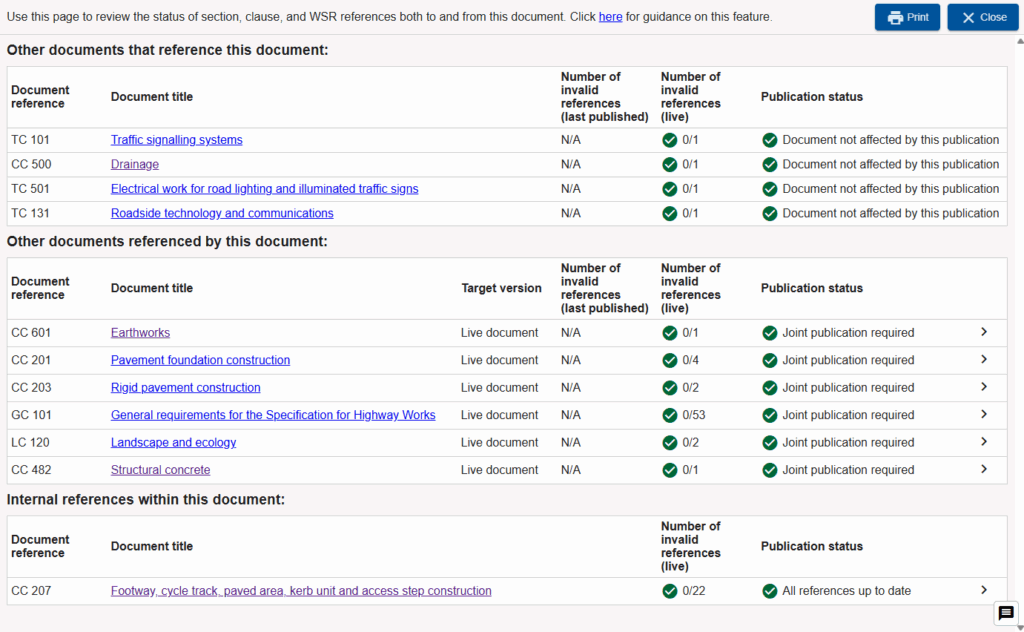
Other documents that reference this document
These are other CARS documents which contain WSR, section and/or clause references to the current document. Document references and titles are listed. The document title acts as a link to the CARS document. Please note that you may need to contact the Lead Author of the linked document if you do not have permission to view it; the link is provided irrespective of your permissions to view the document.
After the document title, there are 2 columns reflecting the status of the references to the current document within the respective “external” (to this) document. The first column reflects the references health of the last published version, the second that of the current live version. “N/A” is shown in the first column if that document has never been published. If it has been published, then the associated published version number and date of publication is shown. If there are any invalid references in the last published version, then that document contains references that are not aligned to the latest content of the current document and joint publication is required. The number of invalid references in the live version column will show whether the document has been updated in readiness to be jointly published; if there are are invalid references, these need to be addressed by the authors of that document. The “Publication status” provides a simply indication of any action required.
Other documents referenced by this document
These are other CARS documents that are references within WSR, section and/or clauses references within the current document. As above, document references and titles are listed and the document title acts as a link to the CARS document.
This section as includes the option to control the “Target version” for each referenced document. If the referenced document has never been published, the only option is to point to the live document and hence no change can be applied. if that document has been published then you can elect to target the last published version of the live document. You would select the last published version if you know that the other document will not be ready to publish for some time and you wish to proceed with the publication of your document. NB – if there are invalid references highlighted within the live version of the target document, then you will need to coordinate an update to your document when that document is published.
As per the section above, columns are also provided to show the number of invalid references with respect to the last published or current live version of the target document. These counts will update to reflect the targeted version of the document as selected above; as will the action identified under the “Publication status” column. As before, “N/A” will be shown if the document has never been published; otherwise the last published version number and date of publication will be shown.
To the far right of the rows within this section is an arrow button. Clicking this will expand the entry to show further details. The expanded details is filtered by default to “Exclude valid references”. You can untick this checkbox to see a full listing or all valid and invalid references. The details shown outline the content in the target document that is referenced (i.e. sections, clauses, and WSRs), basic information about the targeted item, whether it is valid or not, and the locations within the current document that reference the targeted item. Links provided will open in a new window (so as to keep the CARS reference summary as generated) and will take you to the relevant section.
Internal references within this document
This section lists all references that point to content within the same document. It will only ever list one document, the current document, and it will only shown counts of invalid references in the live version.
As references are automatically refreshed upon opening the references summary, this section will only show invalid references if targeted content has been deleted.
The expanded details section works in the same way as outlined above.
Back to topPrinting the CARS reference summary
A “Print” button is provided at the top right of the screen to generate a printable version of the reference summary. Currently this triggers a full refresh of the content so will take some time to load.
Once the print preview is displayed, please ensure that the settings are set to print at A3 in landscape orientation for best results.
Back to topKnown limitations
We acknowledge the current known limitations of this feature:
- Document references are not included – authors, please continue to use the document health functionality as provided via the Document Information page to confirm the health of document level references.
- The CARS reference summary page is designed to provide a lot of information in a compact form; it does not render well on small or heavily zoomed in screens.