
Contents
Fields available on the Document Information page
Fields on the Document Information page vary dependent on the document suite. All available fields across all suites are listed below. Where fields are suite specific, the relevant suite is identified in square brackets, i.e. ‘[DMRB only]’.
Document suite
(read only)
The suite within which the document was created. The suite cannot be change once created.
Document title
(editable by the Lead Author and Authors)
The title of the document as will be displayed on the front page of the published document
Document health
(read only – for Lead Authors and Authors only)
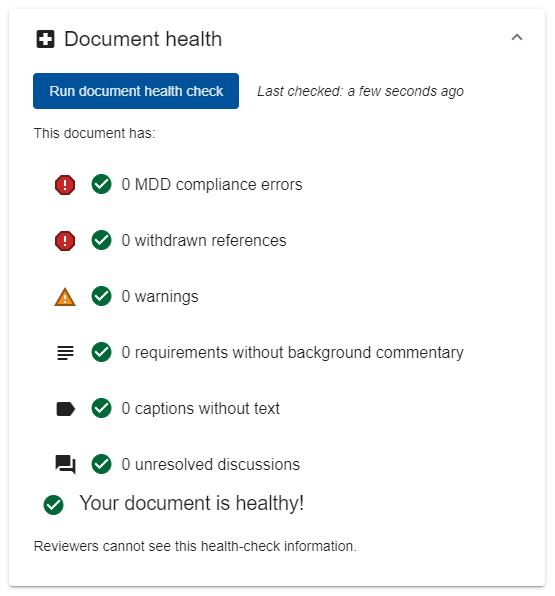
The document health section allows the Lead Author and Authors to check the document for issues, including MDD compliance errors; withdrawn references; missing background commentary etc. The health summary does not automatically refresh. The Document health can be refreshed at any time using the ‘Run document health check’ button provided. The last time the summary was generated is shown as ‘Last checked:’.
Jira Change ABCD ID
(editable by Lead Author and Authors)
This field is used to identify the Jira Change ABCD item that is being used to manage the document through the Standards Governance process. The full code must be entered complete with the ID prefix, i.e. ‘SRP-123’.
The “Jira information block” (see below) will automatically update if a valid Jira ID is provided.
Please note that the state of the linked Jira item can control whether the CARS document is editable or not. This is designed to avoid changes being made to the document whilst approval and authorisation processes are in progress.
Back to topSummary [DMRB only]
(editable by Lead Author and Authors)
Brief text outlining the intended purpose of the document. The summary text is included on the front page of the published document. The summary shall not provide details of the any changes made within the document; this is to be outlined within the “Release notes for publication”.
SHW Summary [MCHW only]
(editable by Lead Author and Authors)
Brief text outlining the intended purpose of the SHW document. The summary text is included on the front page of the published SHW document. The summary shall not provide details of the any changes made within the document; this is to be outlined within the “Release notes for publication”.
IfS Summary [MCHW only]
(editable by Lead Author and Authors)
Brief text outlining the intended purpose of the IfS document. The summary text is included on the front page of the published IfS document. The summary shall not provide details of the any changes made within the document; this is to be outlined within the “Release notes for publication”.
Legacy reference (DMRB only)
(editable by Lead Author and Authors)
The reference (document codes) of the legacy document(s) that the document will supersede, e.g. GD 01.
Please note that this field should not be used to make reference to the previous version of the same document – this is handled within the automatically generate release notes section of the published document. This field is typically only required as part of a full suite refresh programme.
Back to topSHW Legacy reference (MCHW only)
(editable by Lead Author and Authors)
The reference (document codes) of the legacy document(s) that the SHW document will supersede, e.g. Series 0100.
Please note that this field should not be used to make reference to the previous version of the same document – this is handled within the automatically generate release notes section of the published document. This field is typically only required as part of a full suite refresh programme.
Back to topIfS Legacy reference (MCHW only)
(editable by Lead Author and Authors)
The reference (document codes) of the legacy document(s) that the IfS document will supersede, e.g. Series NG 0100.
Please note that this field should not be used to make reference to the previous version of the same document – this is handled within the automatically generate release notes section of the published document. This field is typically only required as part of a full suite refresh programme.
Back to topDocument code (DMRB only)
(editable by Lead Author and Authors)
The reference code to be used for the document when published.
The reference code used for DMRB documents comprises five characters, of which the first two are based on the location of the document within the new structure (i.e. combination of discipline and lifecycle codes) and the final three are a unique number allocated by the policy group responsible for the discipline to which the document is allocated.
NB the Document number is required to be able to create a version “For approval/authorisation”.
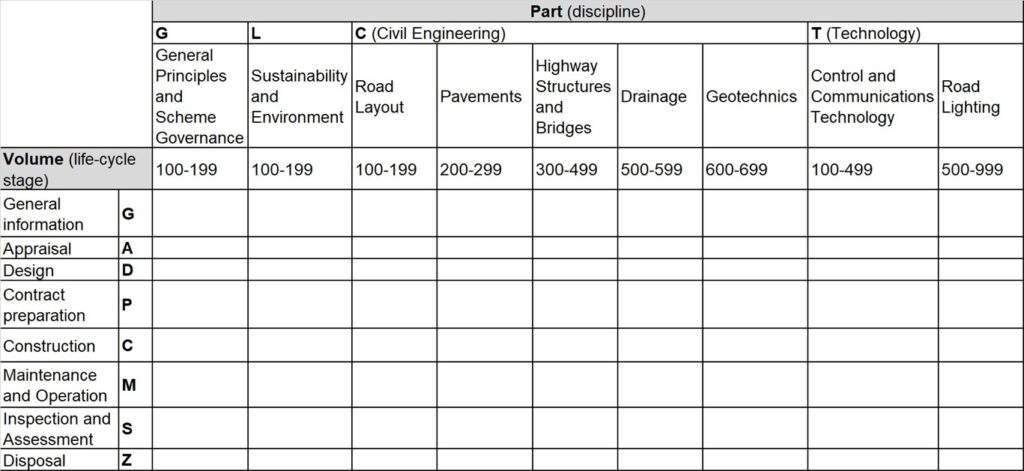
The discipline structure and related codes are as follows:
- General Principles & Scheme Governance ”G”;
- Sustainability & Environment ”L”;
- Civil Engineering ”C” (comprising road layout, pavement, structures and bridges, geotechnics and drainage);
- Technology ”T” (comprising control & communications technology and road lighting).
The lifecycle structure and related codes are as follows:
- General Information ”G”;
- Appraisal ”A”;
- Design ”D”;
- Contract preparation “P”;
- Construction ”C”;
- Maintenance & Operation ”M”;
- Inspection & Assessment ”S”;
- Disposal ”Z”.
As an example: ‘GD 304 – Designing health and safety into maintenance’
- “G” indicates this document relates to the General Principles & Scheme Governance discipline
- “D” indicates this document relates to the Design lifecycle
Document number (MCHW only)
(editable by Lead Author and Authors)
This is the numerical part of the document’s reference code. Since multiple documents are generated upon publication of an MCHW document, the associated document references are automatically generated. The 3 or 4 digit unique number is allocated by the policy group responsible for the discipline to which the document is allocated. A validation error will be displayed if anything other than a 3 or 4 digit number is provided.
NB the Document number is required to be able to create a version “For approval/authorisation”.
Back to topIfS document code (MCHW only)
(read only)
This is the automatically generated Instructions for Specifiers (IfS) document reference code as defined by the “Document number” and “Discipline” provided. If either of those fields has not been provided, then the IfS document code will be blank. The IfS document code is hard-coded to reflect the “Contract preparation” lifecycle stage.
SHW document code (MCHW only)
(read only)
This is the automatically generated Specification for Highway Works (SHW) document reference code as defined by the “Document number” and “Discipline” provided. If either of those fields has not been provided, then the SHW document code will be blank. The SHW document code is hard-coded to reflect the “Construction” lifecycle stage.
Published version number
(read only)
This read only field will show the last published version number for the document. If the document has never been published before then this field will be blank. If there are any errors with the value shown for the ‘Published version number’ please contact Standards_Enquiries@nationalhighways.co.uk.
See ‘A note on version numbers’ for more information about changes made to version numbering of documents.
Back to topCategory of change
(editable by Lead Author and Authors)
The category of change identifies the reason why updates are being made to the document and is directly related to the governance processes applied to review and approve the changes. There are 4 categories of change available:
- Category A: Change to policy, major revision, new document development
- Category B: Incremental change to requirements
- Category C: Incremental change to advice
- Category D: Incremental change to notes and editorial updates
The ‘Provisional next publication version number’ (see below) is automatically generated based on the category of change. See ‘A note on version numbers’ for details of the relationship.
NB the category of change is required to be able to create a version “For approval/authorisation”.
Back to topProvisional next publication version number
(read only – automatically generated)
The next publication number is automatically generated based on the ‘Published version number’ and the ‘Category of change’. It is ‘provisional’ because the approval process may determine that a different category of change is applicable and hence the version may be different when eventually published – hence this field is for information only. See ‘A note on version numbers’ for details of how the new publication version number varies based on the category of change.
Please note, if the provisional next publication version number starts with a “0.” then the category of change is incorrect. if the document has never been published then the category of change must always be ‘Category A’.
Back to topRelease notes for publication (DMRB only)
(editable by Lead Author and Authors)
This field defines the text that will be included as the release notes within the DMRB published exports, within the release notes in GG 000, and within the ‘Latest updates’ section and Document Pages of the Standards for Highways website.
NB Release notes are required to be able to create a version “For approval/authorisation”.
The field supports multiple lines; logically, simply press ‘enter’ when entering text to start a new line.
Back to topRelease notes for SHW publication (MCHW only)
(editable by Lead Author and Authors)
This field defines the text that will be included as the release notes within the SHW published exports, within the release notes in GC 000, and within the ‘Latest updates’ section and Document Pages of the Standards for Highways website.
NB Release notes are required to be able to create a version “For approval/authorisation”.
The field supports multiple lines; logically, simply press ‘enter’ when entering text to start a new line.
Back to topRelease notes for IfS publication (MCHW only)
(editable by Lead Author and Authors)
This field defines the text that will be included as the release notes within the IfS published exports, within the release notes in GP 000, and within the ‘Latest updates’ section and Document Pages of the Standards for Highways website.
NB Release notes are required to be able to create a version “For approval/authorisation”.
The field supports multiple lines; logically, simply press ‘enter’ when entering text to start a new line.
Back to topDocuments affected by the next release
(editable by Lead Author and Authors)
This field is used to populate the ‘Changes made to’ column on the automatically generated ‘Release Notes’ page within published document; providing the reader with a clear indication of whether the core document and/or National Application Annexes have been updated.
Options available in this multi-select list are:
- Core document
- England NAA
- Northern Ireland NAA
- Scotland NAA
- Wales NAA
Please ensure that all options applicable are selected. The “Core document” option shall not be used for NAA documents.
NB the “Documents affected by the next release” is required to be able to create a version “For approval/authorisation”.
Back to topDiscipline
(editable by Lead Author and Authors)
Defines the parent discipline for the document. Available options are listed below.
- General Principles & Scheme Governance
- Sustainability & Environment
- Road Layout
- Pavement
- Highway Structures & Bridges
- Geotechnics
- Drainage
- Control & Communications Technology
- Road Lighting
Please note that for DMRB documents, the selected Discipline and Lifecycle Stage should be reflected in the first 2 letters of the Document Code. This relationship currently needs to be maintained manually. For MCHW documents, the Discipline is used to define the automatically generated SHW and IfS document codes.
NB the Discipline is required to be able to create a version “For approval/authorisation”.
Back to topLifecycle Stage (DMRB only)
(editable by Lead Author and Authors)
Defines the Lifecycle stage that the document relates to. Available options vary dependent on suite and are listed below.
- General Information
- Appraisal
- Design
- Contract Preparation
- Construction
- Maintenance & Operation
- Inspection & Assessment
- Disposal
Please note that the selected Discipline and Lifecycle Stage should be reflected in the first 2 letters of the Document Code. This relationship currently needs to be maintained manually.
NB For DMRB documents, the Lifecycle stage is required to be able to create a version “For approval/authorisation”.
Back to topAssociated documents (MCHW only)
Please refer to the dedicated help page for Associated documents for more information on this feature.
Back to topJira information block
(read only)
All content in this light blue boxed section is loaded from Jira when a valid Jira Change ABCD ID is set. The information provided outlines the current status of the document within the Standards Governance approval process.
Technical Author
(read only)
Confirms the Technical Author for the document as recorded within Jira – the workflow management tool used for all updates to the DMRB and MCHW document suites. If the Technical Author listed is incorrect, please contact your Technical Standards Committee Chair in the first instance.
When a valid Jira Change ABCD ID is not provided, this field will display ‘Unknown User’.
Jira Change ABCD ID
(read only)
This field repeats the value set in the Jira Change ABCD ID and is used as a confirmation that a valid Jira link is in place.
When a valid Jira Change ABCD ID is not provided, this field will display ‘undefined’.
Workflow Status
(read only)
Confirms the current workflow status for the linked Jira Change ABCD item.
Please note that when the workflow status is within an Approval or Authorisation phase the CARS document will automatically be locked for editing for all but administrators. This safeguard ensures that the document is not altered whilst undergoing final stages of approval in readiness for publication. If document changes are necessary, ensure that the document is passed back with comments within the Jira workflow and the lock within CARS will be automatically released.
When a valid Jira Change ABCD ID is not provided, this field will display ‘No JIRA Link’.
Back to topLead author, Authors, Reviewers, Peer reviewers
Please see the separate CARS Overview: Permissions page for details of these fields.
Back to topA note on version numbers
There was a change in language from ‘revision number’ to ‘version number’, and the introduction of a 3 point number, for all newly published DMRB standards documents from March 2021 onwards.
To make it clearer about what type of change has been made, the standards documents are versioned as follows:
- New documents/major revision/policy change – 1.0.0 (The first number 1.0.0 represents the first publication of a new document, a major revision to a standards document, or a change to policy)
- Changes to requirements clauses – X.1.0 (The second number represents a change to requirements but not a wholesale update, and the first number stays the same as it was previously as this is not a major revision)
- Changes to advice clauses or notes/spelling mistakes – X.X.1 (The third number represents a more minor change to the standards document and the first and second number stay the same as they were previously)
Details of the changes to a document will be provided in the release notes.