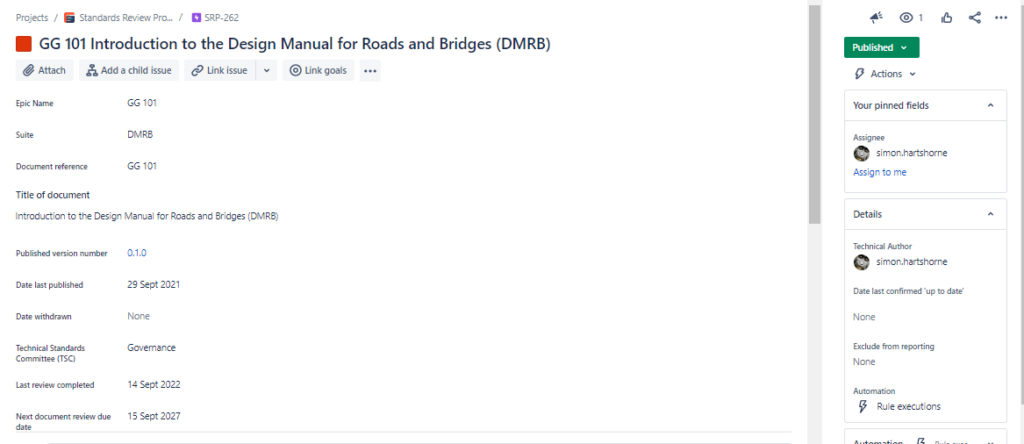
An epic within Jira is a large body of work that can be broken down into a number of smaller stories, or sometimes called “Issues” in Jira. For our purposes, an epic represents a document in the Design Manual for Roads and Bridges (DMRB) or Manual of Contract Documents for Highway Works (MCHW). You can tell you are on an epic page by the purple symbol with a white lightening bolt.

Epics only contain very high level information about a document including:
- Suite – e.g. DMRB or MCHW
- Document reference – e.g. GG 101
- Title of document – e.g. Introduction to the Design Manual for Roads and Bridges
- Published version number – e.g. 1.0.0
- Date last published
- Date withdrawn – if applicable
- Technical Standards Committee (TSC) – the discipline who owns the document
- Last review completed – see document maintenance for further details of regular reviews of standards
- Next document review due date – 5 years after the previous document review
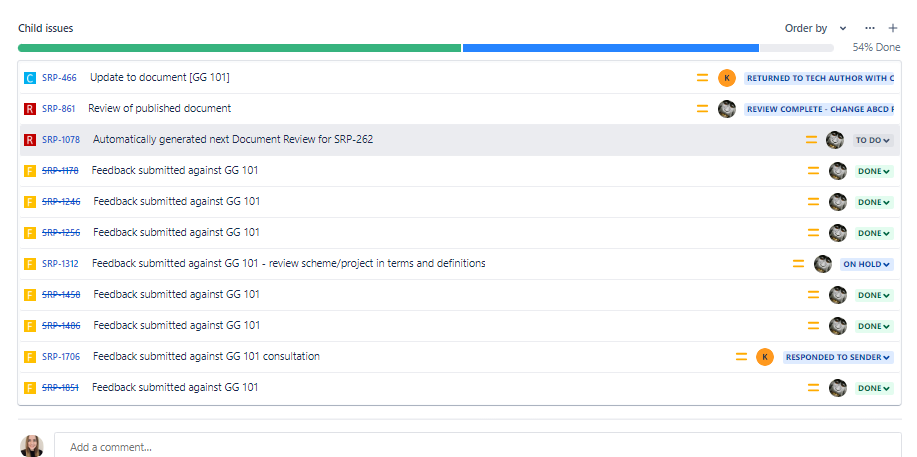
An epic contains no governance information and instead acts as the ‘parent’ issue for any associated actions to the document. If a change is made to the document, the epic will contain an associated ‘Change ABCD’ issue. The epic also shows any associated document reviews completed on the document or feedback items received: