
Contents
This guidance is for those undertaking the Technical Standards Committee (TSC) chair role.
Manual for Development of Documents – role and responsibilities
The role and responsibilities of a TSC chair can be viewed in MDD part 1 Governance of document development. Please see in particular:
- Section 4 Key roles and responsibilities (summary of your role)
- Section 8 Governance process for document development (summary of the governance workflow stages and associated deliverables)
- Section 13 Consultation (aims of a TSC, setting up a TSC, TSC membership, responsibilities, meetings and outcomes).
TSC chair governance training video
If you are new to the role or need a refresher of the Standards Governance process and your role and responsibilities, please view this training video for TSC chairs.
It is also available as a PDF output to look back on the slides.
Commercial impact assessment
PDF copy of the slides is available here.
Back to topProcess for sending documents out to consultation
Governance deliverables and consultee lists
Please refer to the checklist guidance on governance deliverables and versioning to ensure all required materials are in place for the consultation.
As a reminder, a list of TSC consultees per discipline can be found here and they should be added as ‘reviewers’ on the front page of your CARS document.
All governance deliverable templates are stored here. Please ensure you download your own copy of any templates rather than editing the master template, and upload to your document specific folder. There are folders for each DMRB document or MCHW Series to store governance deliverables within the DMRB and MCHW training materials and governance SharePoint site (restricted access).
Please email standards_enquiries@nationalhighways.co.uk for any queries.
Back to topProgramme dates and Jira
Please ensure your document is sent out for consultation according to your forecast TSC consultation start date in the programme so consultees can manage their resource.
Programme dates are recorded on the Jira programme management tool and an overall summary with TSC discipline filters can be viewed here by Jira users. If you need a recap of how to use Jira, please click here.
If you need to amend your forecast TSC consultation start or conclusion date, please submit a date change request in your Jira change issue.
Back to topConsultation periods
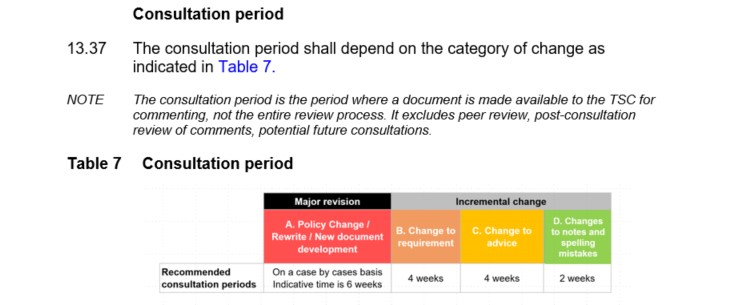
The suggested consultation periods for document reviews based on category type are detailed in the ‘Consultation’ section of MDD part 1.
Notice of consultation
It is good practice to send an email to consultees giving notice of the forthcoming consultation. Please see a suggested email template for giving notice of consultation to be edited with your own document information.
Back to topSending your document out to consultation
When you are ready to send out your document to consultation, please see a suggested email template to send to your consultees to be edited with your own document information.
Back to topDuring the consultation
Please refer to the guidance during the consultation.
Back to topAfter the consultation
Please refer to the guidance after the consultation.
Please see a suggested email template for concluding your TSC consultation to be edited with your own document information.
It is recommended that you make the TSC version and post TSC comments version of your document ‘available to reviewers’ on CARS so consultees can review the changes made since the consultation.


Please complete your consultation report (See governance deliverables section) and download a copy of all discussions and comments received as part of the consultation. Both of these pieces of information should be stored in the governance SharePoint folders.
The last action is to update your change issue on Jira with the final links to the CARS document, impact assessment report, consultation report and clause change summary (for categories B, C and D) and progress it for approval. See the Jira training video for guidance.
Back to top