
Contents
Below is a record of previous releases of CARS. Links are provided to additional information and guidance where available.
27 June 2025 – CARS release 4.99
Updated features
- The document listing on the CARS home page now includes the lead author. Previously, the document listing on the CARS home page only listed the Technical Author as set on a linked Jira item. This name is not shown if there is no linkage in place, or if the user has not set their email address visibility within Jira (see this guidance). To ensure there is always a contact visible for each document, the listing has been updated to include the named lead author within CARS.
- Improved messaging when you do not have access to a document. Previously, CARS would display an error message when trying to access a document which you do not have permission to view. The system has now been updated to provide a more informative error message and contact details for the lead author of the document trying to be accessed.
- Improved styling of inline references within CARS documents. When inserting a document reference within a clause, the “reference component” has always had a light grey background to indicate it is not manually entered content. This styling includes some spacing either side of the reference which is not included in the export. This in turn has led to issues with exports (PDF and HTML) missing spaces between references and adjacent text. References are now bounded by a light grey outline so that authors can easily see spacing issues.
- WSR Templates enhancements. Multiple suppliers were engaged in a validation task in 2024 to confirm the usability of the WSR templates automatically generated from the CARS authored MCHW documents. This activity identified several improvement opportunities for the WSR templates, and these have been implemented accordingly:
- SHW references have been extracted into a separate column for clarity.
- Long text now wraps, and initial cells heights are set to match content.
- A new “Purpose” column has been added to facilitate easy flagging of works specific requirements which are not applicable to a scheme, continuation lines, cancelled / substituted requirements etc.
- CARS Reference Summary. A completely new feature is now available via the Document Information page menu for MCHW documents, the CARS reference summary. This page will provide a summary of documents that reference your document, and documents that are referenced by your document, along with information on the health of those references and publication dependencies. Only section and clause level references are currently included within the summary and hence this feature is only relevant for MCHW documents (including MMHW documents). A dedicated help page is available here. Please note this page can take some time to load.
Bug fixes
- Errors within the normative references section for some MCHW documents. A bug introduced with the transition to automated Foreword / Scope sections for MCHW documents resulted in erroneous entries in the normative references section which could not be removed. This bug has now been resolved.
- Empty heading being included in exported table of contents. Empty headings are occasionally used as a recognised workaround to known issues which would require considerable development time to resolve. These empty headings were being included within automatically generated tables of content; a fix has now been put in place to address this.
- Section references – document look up. The document reference code was not being shown when searching for documents within the section references pane. This has now been added to help authors ensure the correct document is selected.
04 June 2025 – CARS release 4.98
(Please note that releases 4.95, 4.96, and 4.97 related to DAS. Release 4.94 only affected administrators and support functions.)
Updated features
- WSR references section. This new feature automatically generates a section within MCHW Instructions for Specifier (IfS) documents providing a listing of WSR templates referenced within the document. The new section is automatically placed after all other sections and cannot be moved. All content within the section is read only. This section is not included in Specification for Highway Works (SHW) documents.
Bug fixes
- Spellcheck performance. Document sections with lots of spelling errors (or words that are not included in the CARS dictionary) had performance issues, e.g., slow/delayed scrolling. Changes have been implemented to improve performance in these circumstances.
- WSR document code wrapping. WSR document codes were being split across line returns due to wrapping. A fix has been implemented to ensure that WSR document codes are kept together, fully starting on a new line where appropriate.
- Superscript and subscript formatting issues in lists within exported HTML. List items that contain super/subscript could have rendering issues where text would overlap. This bug fix slightly increases the line height of list items so that this is not an issue going forward.
- Issues generating WSR schedule previews within CARS. A very specific combination of WSR schedule tables and change log ranges was causing issues with preview generation. This bug has now been fixed.
20 February 2025 – CARS release 4.93
(Please note that release 4.92 related to DAS. Release 4.91 updated security certificates. Releases 4.89 and 4.90 related to the Index Manager.)
Bug fixes
- Image scaling within clause change summary. Images were being scaled incorrectly within the clause change summary; this bug has now been fixed.
21 January 2025 – CARS release 4.88
Bug fixes
- Alt-text fields editable before virus checking complete. Previously, CARS users were able to enter alt-text details for images before they had passed virus and minimum quality checks. This could be abortive if the checks fail. The fields will now only be enabled once all checks have been completed.
- Allow in-line equations within lists in standard format requirements. There was a bug which blocked the insertion of in-line equations within lists in standard format requirements. This bug has now been resolved.
20 November 2024 – CARS release 4.83
(Please note that releases 4.80, 4.81, and 4.82 related to DAS)
Updated features
Manual management of table column widths. Historically, CARS has automatically calculated column widths for tables based on the text entered within cells. Whilst for the majority of use cases this approach works perfectly well, there are a few scenarios where it leads to poorly formatted tables within the PDF outputs; and there is very little an author, or a system administrator can do. A new feature has been added to CARS to allow lead authors, authors, and system administrators to manually control the % column widths for table. Please see full details of this new feature on the dedicated help page.
Back to top08 October 2024 – CARS release 4.79
Updated features
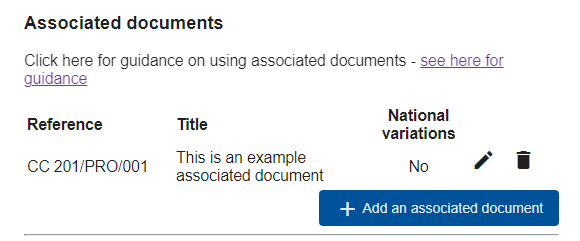
- Associated documents (MCHW only) – new functionality has been added to the Document Information page for MCHW documents. An “associated document” is the term used for content produced outside of CARS but is to be published alongside the controlled document authored within CARS. A record of any associated documents to be included in publication is captured on the document information page within CARS. This helps to ensure that all required documents are included when the controlled document is published. Further guidance on this new feature can be seen here.
Bug fixes
- Document previews – there was a bug where refreshing the screen when viewing a document preview would cause the document to be downloaded. This bug has now been fixed.
17 September 2024 – CARS release 4.78
(Please note that release 4.77 related to DAS)
Bug fixes
- Some document sections not fully loading – a specific sequence of author actions were identified that could cause breaking content within a section’s data structure. This would lead to the remaining content of the section not being shown in CARS. A bug fix has been implemented so that this situation can no longer occur, and all existing document content has been scanned to ensure there are no issues remaining.
02 September 2024 – CARS release 4.76
(Please note that release 4.75 related to WordPress (help pages) updates and cyber remediation actions)
Updated features
- Section cloning updates – The ability to clone sections (originally released for MMHW documents only) is now available to all CARS suites. Furthermore, the section cloning feature now also supports:
- Internal references
- Optional cloning of discussions
Bug fixes
- Persisting document health check results – There was a bug where the results of the last document health check (available to authors) were not being retained between document visits. This was causes issues during quality review. This bug has now been fixed.
- Unused “Unrestricted” templates removed – out-dated templates within the “Unrestricted” document suite have been removed.
12 December 2023 – CARS release 4.56
Updated features
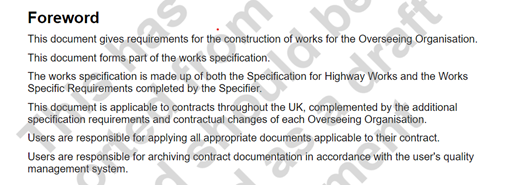
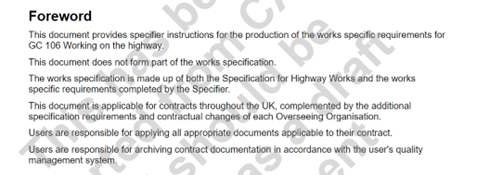
- Automated forewords for MCHW documents – As previously pre-advised to MCHW document owners via Teams, existing Foreword and Introduction sections within MCHW documents have been removed. Going forward, a Foreword section will be automatically generated upon export from CARS with pre-defined content for both SHW and IfS documents created. The content of the removed Foreword and Introduction sections will still be visible via versions created prior to this change. In cases where documents were not already in an approval cycle, specific versions were created to ensure that any prior authored content would be accessible. Please see below screenshots of the pre-defined Foreword text; this will only be visible on exported documents (HTML and PDF).
Bug fixes
- CARS | Jira Integration bug fix – Legacy @highwaysengland.co.uk email addresses for users in both CARS and Jira were leading to issues mapping Technical Authors when linking Jira Change Items to CARS documents. A fix has been implemented to ensure that this issue is handled, and users are correctly mapped.
25 October 2023 – CARS release 4.53
Updated features
- WSR template improvements – The WSR templates that are available to be exported from CARS (by members of the Technical Standards Group) have had the following improvements made:
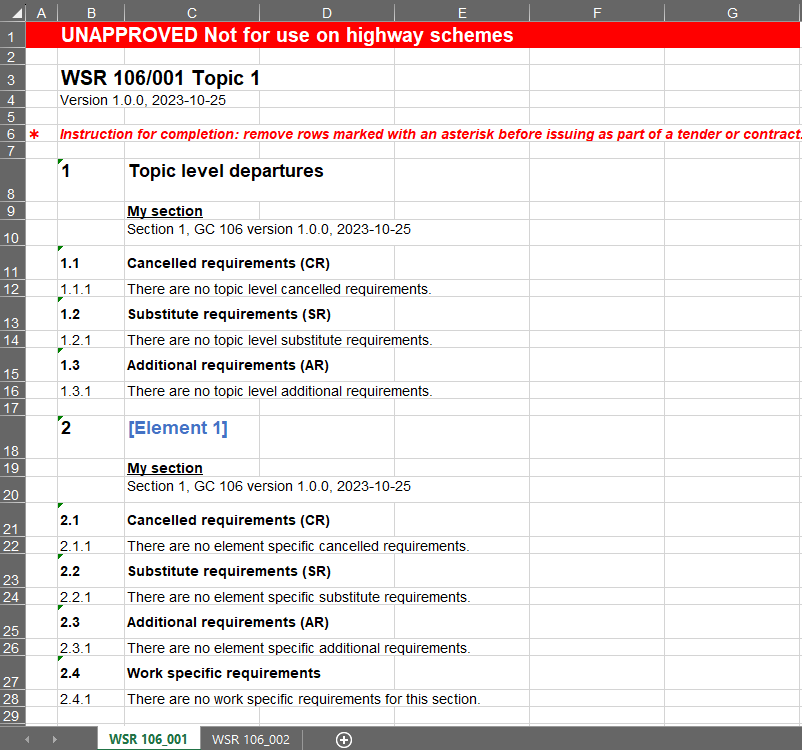
- Addition of a ‘watermark’ at the top of each WSR template, for non-published files, which clearly states “UNAPPROVED Not for use on highway schemes“.
- Addition of the WSR template publication version and date beneath the title of each WSR template.
- WSR templates are now created for all SHW document sections to facilitate cancelled, substitute and additional requirements (CR, SR and ARs), i.e. departures from the SHW. If there are no specifier instructions for a give WSR, this is now clearly stated.
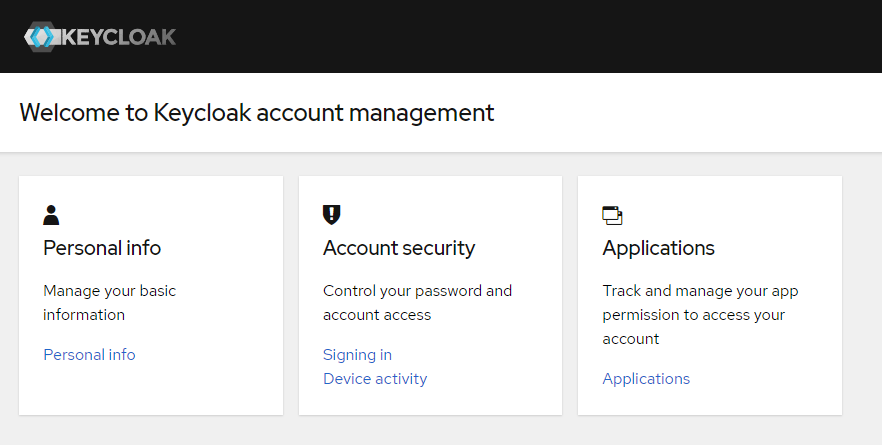
- Authentication system update – CARS uses a system called Keycloak to manage user authentication and application permissions. As part of routine system maintenance, Keycloak has been updated to a more recent version. This version brings an updated user interface that may look different if needed to manage personal details (name, email address etc.). Please be assured that this change is intentional.
- List context menu – Lists within CARS clauses now have a new context menu that allows authors to move them to adjacent clauses, or delete them altogether.

21 September 2023 – CARS release 4.51
Updated features
- Support for adding tables and lists to SFRs within MCHW documents – Up until this change, Standard Format Requirement (SFR) clauses were not able to contain tables or lists. Approaches implemented by some colleagues to work around this limitation in the absence of being able to do this have led to misleading validation errors and disjointed document flow. The system has now been updated to allow tables and lists to be added to any SFR clause. Please note that tables and lists shall not be added to clauses which have specifier instructions; doing so will cause problems for the generation of the associated Works Specific Requirements template.
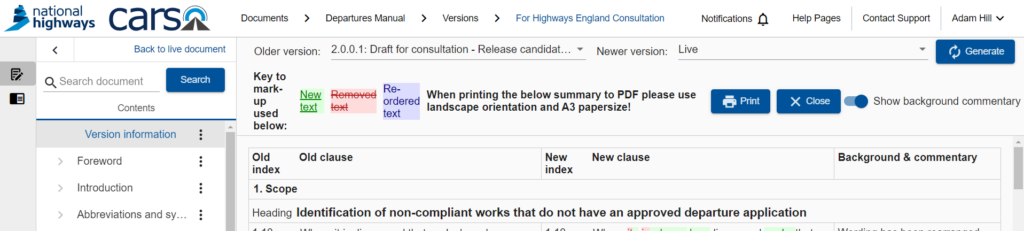
- Ability to generate a Clause Change Summary in comparison to any previous version – Previously, a Clause Change Summary could only be generated against the last published version of a document. This feature has now been enhanced to allow the selection of the versions to be compared, similar to the existing “Section Compare” functionality. Simply select an “older” and “newer” version for comparison and click “Generate” to create the associated Clause Change Summary. This new capability will be helpful throughout document development, e.g. to demonstrate changes made in response to consultation comments.
Bug fixes
- Accessibility improvements – updates have been applied to improve the navigation around the right hand side bar, and the insertion of images into a document, when solely using a keyboard for input.
09 August 2023 – CARS release 4.42
Updated features
- Unrestricted and Method of Measure permissions update – Lead authors of these document suites in CARS can now export their documents to PDF and HTML without having to contact the NH Technical Standards Group.
- New WSR Review document – A new WSR output is available for content reviewers and content specialists. This new output combines all WSR templates and country specific specifier instruction variations into a single file, making it easier to be reviewed for quality.
Bug fixes
- Document references search – Previously, entering search criteria in the existing document references search page did nothing. This has now been fixed and existing references will be correctly filtered by the search term provided.
- NAA skip to content – HTML exports include a “Skip to content” link at the top of the document to jump straight to the table to contents. These links within adjoined National Application Annexes (NAAs) were incorrectly taking the user to the core document’s table of contents. This bug has now been fixed.
27 July 2023 – CARS release 4.41
Updated features
- Sticky notifications – The notifications listing, available from the top navigation bar, will now show past events, across current and previous CARS sessions. This means that users can now close the browser whilst waiting for exports to be generated, or versions to be created, and then be able to access the content at a later time.
- New Method of Measurement suite – A new suite has been added to CARS to assit with the authoring of Method of Measurement documents.
13 July 2023 – CARS release 4.40
(Please note that releases 4.38 and 4.39 related to backend updates and DAS)
Updated features
- CARS document revert – is feature allows members of the National Highways (NH) Technical Standards Group (TSG) to restore the contents of a previous version of a CARS document in place of the current live document. This functionality does not wind the clock back; it simply replaces all contents of the current live document with the contents of the version selected to revert to; any versions “in between” remain in place. This means that the full history of authoring changes made is not lost.
- MCHW output selection – Users who can export MCHW documents now have the ability to choose which outputs (SHW, IfS, WSR + country specific versions) are generated as part of the export. This reduces the time required to get specific outputs.
07 July 2023 – CARS release 4.37
(Please note that release 4.36 related to the Publication API)
Updated features
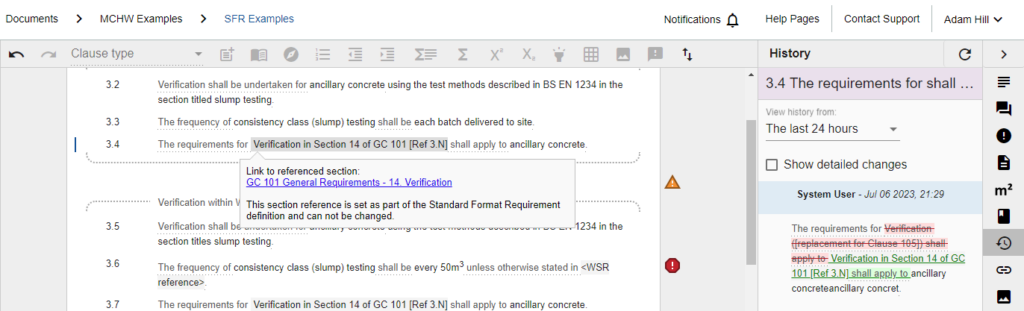
- Updated references to preliminary clauses within standard format requirements – Up until this change, standard format requirements that contain references to preliminary clauses had placeholder text referring to the current MCHW equivalent – i.e. “The requirements for Verification ([replacement for Clause 105]) shall apply to…”. That placeholder text has now been automatically replaced with reference to the relevant section in GC 101, “Specification for Highway Works (SHW) general requirements”. The new text for the example above will now read: “The requirements for Verification in Section 14 of GC 101 [Ref #.N] shall apply to…”. The normative reference number ([Ref #.N]) will vary by document.
All MCHW documents within CARS have been automatically updated, there is no action required by authors. The change has been applied to the “live” document only. Versions previously created, including those currently out for consultation, have not been updated. The update is recorded within the history for each affected clause, with the change recorded as being made by “System User”.
The new references do provide links within CARS to the associated document; these links will only work if you have permissions on that document. The references cannot be changed by authors.
- Allow quoted requirements within introductory and appendix sections – previously, validation rules would always report errors if introductory or appendix clauses contained the words “shall” or “must”. Feedback received identified the need to be able to quote requirements in these sections. The validation rules for those section types have now been updated to permit requirements when contained within quotation marks.
- Default value for “in the capacity of” – consultees often review multiple documents in the same capacity, i.e. as a commercial, or health and safety reviewer. If raising several discussions as part of a review, it can be laborious to repeatedly select the same “in the capacity of” option within the discussions pane. This update means that your last selection (against any document) will be remembered and used as the default for your next discussion.
Bug fixes
- Document references panel performance issues – some colleagues reported that it was taking over 30 seconds for the document references panel to load. Significant performance enhancements have been applied as part of this release.
- Document health check linkage error counts issue – Some documents were showing incorrect error counts for missing verification and documentation links. This bug has now been fixed.
- Alt-text changes not shown in clause history – Changes to alt text, and who made them, are now shown in the associated clause history.
- Issues deleting text within nationally determined standard format requirements – Attempting to select user input text within a nationally determined standard format requirement and then pressing delete was incorrectly showing a message that such action is not permitted. This bug has now been fixed.
- Spell check not working within nationally determined standard format requirements – Associated with the bug above, this bug has not been fixed.
- Validation not always applied in tables – In some circumstances, validation checks were not been correctly performed within table cells. This bug has now been fixed.
07 June 2023 – CARS release 4.35
(Please note that releases 4.23 through 4.34 related to backend system changes and other TSES tools with no CARS user affecting changes)
Bug fixes
- Change log issues for document with very large table – performance improvements implemented to avoid issues when using the change log with very large tables.
02 March 2023 – CARS release 4.22
02 March 2023 – CARS release 4.22
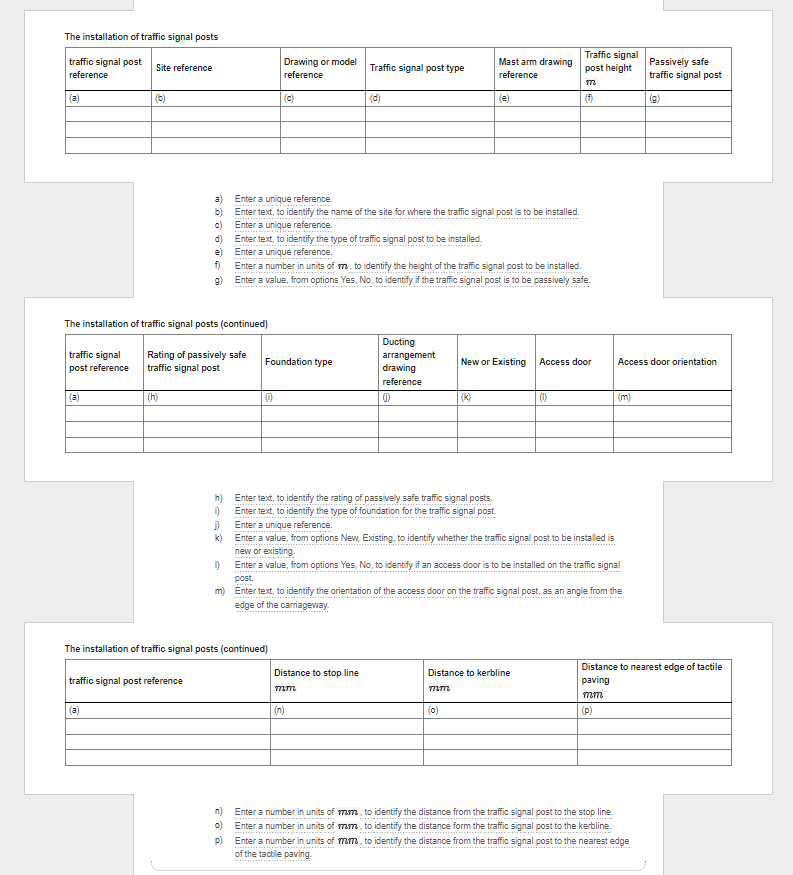
- Schedule previews (MCHW only) – In order to help Technical Authors visualise how a schedule will be presented within the Instructions for Specifiers (IfS) document, CARS now provides a preview function. The preview has all of the content that is included in the export; i.e. the caption, the schedule in tabular form, and instructions to the Specifier on how to populate the schedule. The preview is provided below the related specifier instructions (SI). An example is shown in the screenshot below.
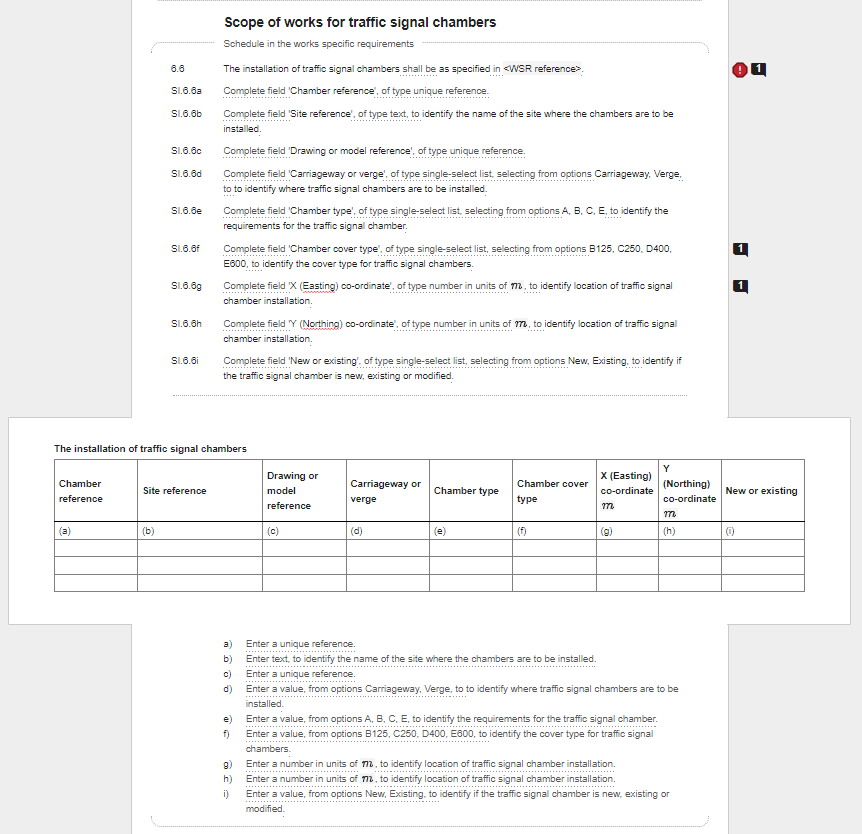
The schedule is automatically generated upon accessing the document’s section and can be refreshed to reflect any authoring changes made using the refresh button added to the standard format requirements menu, see screenshot below.
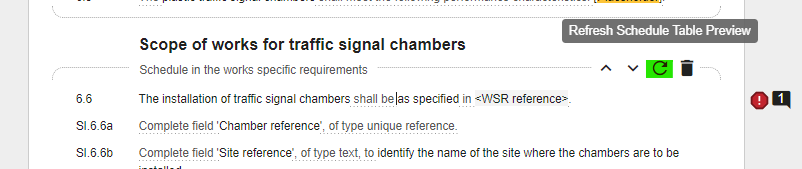
For more information on schedule previews please read the dedicated help page.
- Enhanced MCHW exports – both HTML and PDF exports now include the ‘rendered’ tabular schedule views as shown in the previous item; they do not include the schedule SIs as authored. MCHW documents are currently only exported as a single document, which is effectively the IfS document as they include the specifier instructions alongside the constructor requirements. This will be updated in the next release to export separate Specification for Highways Works (SHW) and IfS documents. Exports of draft CARS documents can only be generated by members of the Technical Standards Group (TSG).
- Automated schedule splitting (MCHW only) – CARS will now automatically split the rendered schedule when there are too many columns to fit on to a single landscape page. This is applied to the preview and all exports. Further details are provided on the help page.
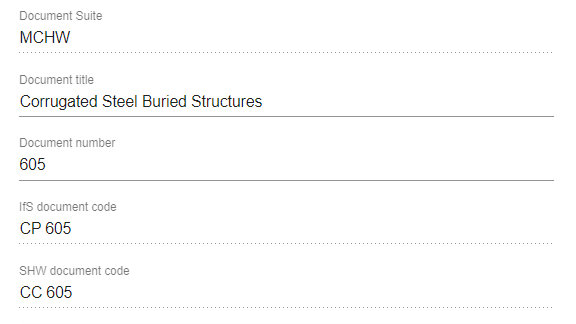
- Changes to how MCHW document codes are entered – Previously, Technical Authors were asked to provide the new document code for MCHW documents. This was causing confusion given that the authored content will be published in both SHW and IfS documents, i.e. multiple document codes apply. The Document Information page for MCHW documents has now been updated to request the ‘Document number’ part only, i.e. ‘605’ instead of ‘CC 605’. Two additional read-only fields have also been added which show the respective SHW and IfS document codes – these will only be calculated once the number part and Discipline have been set. Please note, the ‘Lifecycle Stage’ has been removed for the same reason.
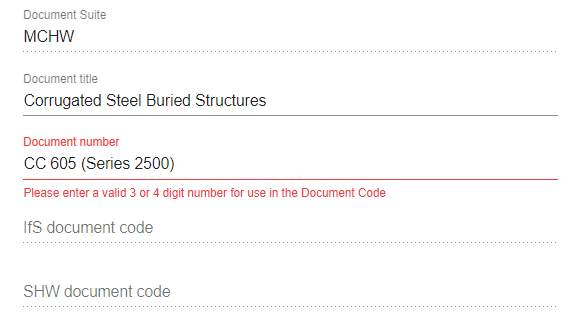
- Please note that existing document codes have been retained as part of this change but they will show as an error until the field is updated to include the document number part only. See the screenshot below as an example of how this error will appear.
Bug fixes
- Duplicate document references – In some specific circumstances, duplicate document references could be created within a CARS document, causing issues loading sections. This bug has now been resolved.
- Changes to alternative text not shown in the Clause Change Summary – Any changes made to alternative text (‘alt-text’) are now shown in the Clause Change Summary and section compare views.
- Missing colon in ‘Documentation (continuous records)’ standard format requirement – there was a missing colon before the list of documentation within this SFR; this has been added an all existing occurrences will have been updated.
2nd December 2022 – CARS release 4.12
Updated features
- Ability to insert Works Specific Requirements (WSR) references – previously, standard format requirements that direct the constructor to the WSR had an un-editable placeholder of ‘<<Ref to WSI>>’ in them. This placeholder has now been replaced with new functionality to be able to set the WSR reference. Please note that WSRs were previously referred to as ‘Works Specific Inputs’ (WSI) during original MCHW authoring training; the name has been changed to emphasize that WSR, in the form of completed specifier instructions, are requirements on the constructor. All references to WSI within the system have now been updated to WSR. Please see the References help page for full guidance on how to insert WSR.
- Review status on the Version Information page is now available to peer reviewers – when a CARS document version is issued for review, Reviewers have a ‘Review status’ section on the Version Information page where they can record when they have started and completed their review. This feature is now also available to Peer Reviewers.

- New schedule based specifier instruction (SI) templates – six new specifier instruction templates have been added to the system. They all relate to schedule column definition and hence can only be inserted under the ‘Schedule in the works specific requirements’ standard format requirement (SFR). The new templates are:
| Template text | Description |
| Complete field ‘<field name>’, of type unique reference, to <reason for the column>. | Adds the ability to provide a reason when defining a unique reference column. |
| Complete field ‘<field name>’, of type unique reference, selecting from options as defined in <schedule SI clause Index> of <document code>, to <reason for the column>. | Adds the ability to have a column where the permitted options are taken from the values entered in a unique reference column of another table. The new column is of type unique reference, so the selected value can only appear once in that schedule column. |
| Complete field ‘<field name>’, of type single-select list, selecting from options as defined in <schedule SI clause Index> of <document code>, to <reason for the column>. | Adds the ability to have a column where the permitted options are taken from the values entered in a unique reference column of another table. The new column is of type single-select list, so there are no restrictions on how many times the selected value can be used in that schedule column. |
| Complete field ‘<field name>’, of type multi-select list, selecting from options as defined in <schedule SI clause Index> of <document code>, to <reason for the column>. | Adds the ability to have a column where the permitted options are taken from the values entered in a unique reference column of another table. The new column is of type multi-select list, so more than one value can be selected and there are no restrictions on how many times the selected value(s) can be used in that schedule column. |
| Complete field ‘<field name>’, of type single-select list, selecting options which are dependent on the value selected in <schedule SI clause Index> in <document code> from: <options syntax>, to <reason for the column>. | Adds the ability to have a column where the permitted values vary based on the selected value in another column, facilitating cascading option selection. Only one value can be selected. This template requires a very specific ‘options syntax’; please see the ‘Using specifier instructions’ help page for full guidance on how to use this template. |
| Complete field ‘<field name>’, of type multi-select list, selecting options which are dependent on the value selected in <schedule SI clause Index> in <document code> from: <options syntax>, to <reason for the column>. | Complete field ‘<field name>’, of type unique reference, to <reason for the column>. |
Bug fixes
- Discussions against a figure are now retained if the figure is replaced with another – previously, using the ‘replace figure’ option within CARS would clear the figure caption and any discussions recorded against the figure. This meant that the review history against a figure would be lost if an updated figure was uploaded. The caption and discussions are now retained when a figure is replaced.
- Change Logs with lots of defined ‘link ranges’ were crashing/taking a long time to load – the ‘link ranges’ are now only loaded for the visible content and hence the performance of this functionality has been greatly improved.
- Department for Infrastructure Northern Ireland logo update – the current logo has now been added to the system and will appear on all future publications (core documents and NI NAAs).
10th October 2022 – CARS release 4.8
(Please note that release 4.7 related to the Index Manager and KeyCloak authorisation only)
Updated features
- Validating the resolution of uploaded images – images uploaded to CARS should have a minimum resolution of 300dpi to ensure the quality of exported figures in PDF documents. A validation warning will now be displayed for all figures with images of lower resolution.
Figures are also now shown within the CARS authoring pad at the same size as they will appear within the final exported document. For more information on this enhancement, and how to create images so they are not scaled within CARS, please see this help page.
- Exporting ‘Unrestricted’ documents – the Document Information page for ‘Unrestricted’ documents now includes a number of additional fields that are used to manage the contents of the front and back pages when exporting those documents to PDF or HTML. This enhancement means that CARS can now more readily be used to author, manage, and publish documents for suites other than the DMRB and MCHW. For more information on this enhancement, please see this help page.
Bug fixes
- Suggest change bug – when the ‘Suggest change’ feature was used with the Discussions pane already open on the ‘Resolved’ tab, the view was not automatically switched to the ‘Unresolved’ tab – so it was not clear that the suggestion had been loaded in to a draft discussion. This issue has now been resolved; the view is now automatically switched to the ‘Unresolved’ tab when ‘Suggest change’ is clicked.
20th September 2022 – CARS release 4.6
(Please note that release 4.5 related to the Departure Approval System (DAS))
Updated features
- Feedback link update – the feedback link on the front page of DMRB documents as exported from CARS has been updated to point to the new online feedback form (https://www.standardsforhighways.co.uk/feedback)
Bug fixes
- Document health check reflecting deleted clauses – unresolved comments recorded against subsequently deleted clauses (or sub-content) were incorrectly being included within warning counts as part of the document health check. This issue has now been resolved.
25th August 2022 – CARS release 4.4
Updated features
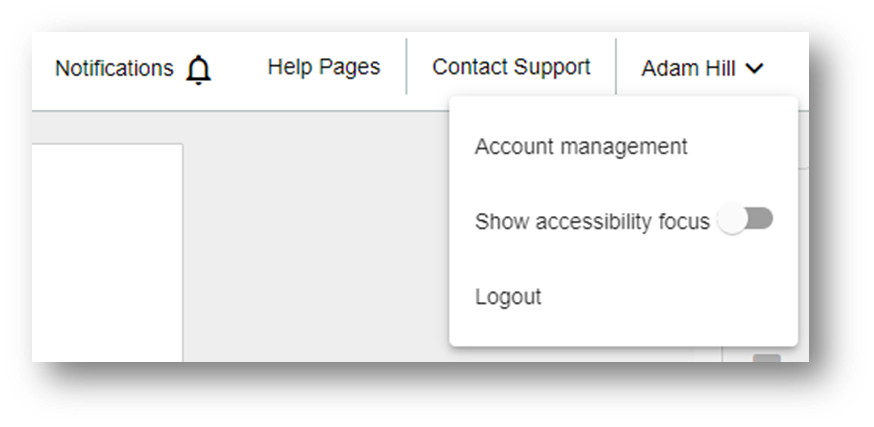
- Accessibility improvements: focus indicators – Keyboard users typically navigate their way through CARS by pressing the tab key. They need to be able to see where they are on a page as they Tab their way through. A focus indicator is a visual indicator that “highlights” the currently focused element. This new features adds the option for users to turn focus indicators on within CARS. The option – “Show accessibility focus” – is provided within the user menu, at the top right of the screen. A toggle switch is used to turn the feature on or off.

- Preparation for enhancements to the export of ‘Unrestricted’ suite documents – a future CARS release will enable the customisation of the front page when exported for documents that use the ‘Unrestricted’ template – this does not include DMRB or MCHW documents. In preparation for that release, additional fields have been added to the Document Information Page for ‘Unrestricted’ documents: Document suite display name, Document logo for export, Document front page footer, and Document back page footer.
This feature is still in development and, whilst any information entered into these fields will be retained, we recommend that no action be taken by ‘Unrestricted’ document owners until the full feature capability is released.
Bug fixes
- Clause change summary –For a limited number of older CARS documents, the clause change summary was not generating correctly. This bug has now been fixed.
26th July 2022 – CARS release 4.0
Updated feature
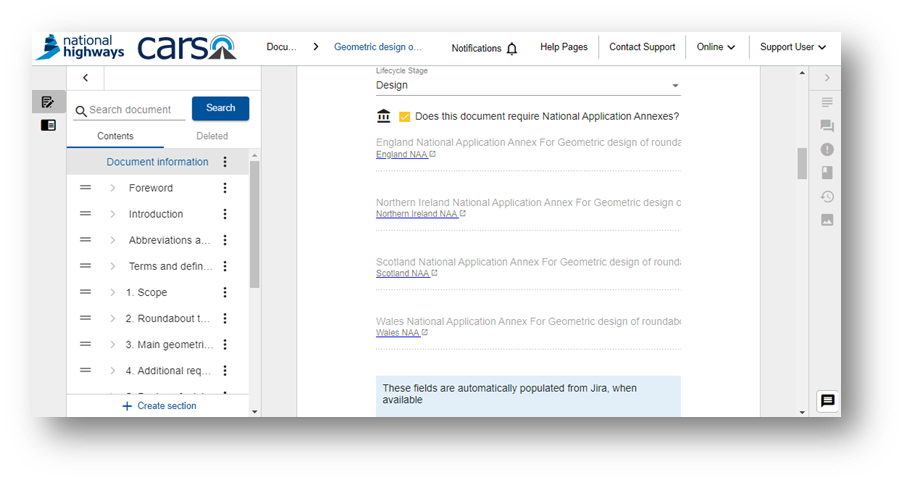
- National Application Annexes linkage (DMRB documents only) – National Application Annexes (NAAs) are now linked to the ‘parent’ document. This enables the automatic production of combined documents for publication and enforces standard document code formats and titles. NAA document codes are now automatically suffixed with an Overseeing Organisation identifier (e.g. “CD 116 – SNAA” for the Scotland NAA).
This change means that NAA documents are no longer manually created. Instead, members of the Technical Standards Group can quickly generate NAAs where required. If you have a new or existing document that requires NAAs in the future, please contact standards_enquiries@nationalhighways.co.uk.
All existing documents in CARS with NAAs have been linked and verified. There is no action for Technical Authors. The only change is that links are provided on the Document Information page to quickly navigate to NAAs from the parent document, or back to the parent from the NAA.
Bug fixes
- Change log bug fix (MCHW only) –The system was erroring when trying to view the change log link table for imported MCHW documents that contained equations. This bug has now been fixed.
12th July 2022 – CARS release 3.29
New feature
- Standard format requirements (SFRs) in nationally determined requirements (NDRs) (MCHW only) – CARS now supports the insertion of SFRs within NDRs – usage of these features remain the same as in the rest of the document.
21st June 2022 – CARS release 3.28
New feature
- CARS virus scanner – All images when they are uploaded to CARS are now virus scanned. A placeholder image will be displayed whist the uploaded file is being scanned. Notifications are provided once the scan has completed.
19th May 2022 – CARS release 3.27
(Please note that releases 3.24-3.26 related to other TSES applications)
New feature
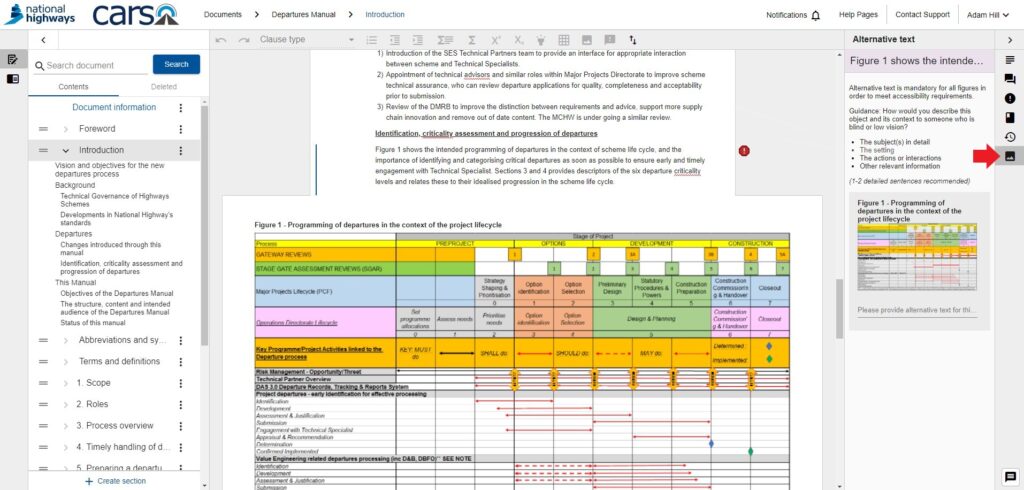
- Alternative text – In order to be able to publish accessible documents to meet the needs of all users in line with accessibility regulations, the DMRB shall progressively be published in HTML format from mid-2022. This means that all figures within CARS authored documents require alternative text.
Alternative text is a textual substitute for non-text content in web pages. Amongst over uses, alternative text enables screen readers to announce alternative text in place of images, helping users with visual or certain cognitive disabilities perceive the content and function of the images.
Functionality has been provided in CARS to facilitate the addition of alternative text for all figures. Guidance on how to use the new alternative text functionality is provided within the CARS help pages.
22nd February 2022 – CARS release 3.23
New features
- New Specifier Instruction template for schedule based SFRs – a new Specifier Instruction template has been added, only for use with schedule based SFRs. The new template allows for unitless numeric fields to be specified:
Complete field '<field name>', of type number, to <reason for the column>.Bug fixes
- Document references and specifier instruction units search issue – when searching within the Document references and Unit selection side panes, if text was entered very quickly then results could be erratic – sometimes only reflecting the first few characters entered in the search field. This bug has been fixed.
- Issues loading the Clause Change Summary – in specific circumstances relating to the order in which references were added to a document, the Clause Change Summary was failing to load. This bug has been fixed.
- Change Log link table not showing published excerpts – when creating Change Logs for MCHW documents, many of the links create between new and old documents were not being shown correctly in the link table. This bug has been fixed.
- Reference indexes not always loading – when adding a reference to a document, the index for that reference was infrequently not showing correctly – showing as ‘?.?’. This bug has been fixed.
14th February 2022 – CARS release 3.22
New features
- Specifier Instruction enhancements (MCHW documents only) – The following changes have been made to Specifier Instructions (SIs) as used in MCHW documents:
- The SI templates have been updated following careful review to ensure they are unambiguous in authoring, peer reviewers understand the intentions of the SIs, and at Technical Standards Committee it is clear what the SIs mean for the final complied specification. Old SI templates have been deprecated; all Technical Authors of affected documents have been contacted by TSG and support is in place to help with the required updates.
- Examples of how each SI template is intended to be used are now provided within the insert modal.
- Different SI templates are intended for use against constructor requirements to those provided for schedule based requirements. The system will now only show the relevant SI templates depending on the currently selected clause. SIs which are associated with an incompatible clause type within the authoring pad will be highlighted with a validation error.
- Wherever possible, SIs should be as specific as possible. Use of the generic ‘<Reason for free text> [enter free text]’ template is discouraged. The system will now prompt for confirmation when electing to use this SI template; please always consider if a more specific template can be used.
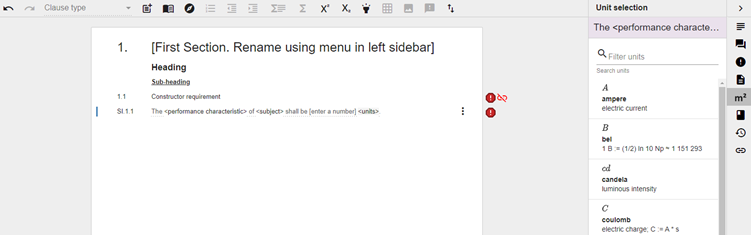
- For SIs templates which reference ‘<units>’, new side panel functionality has been added to insert units. Clicking on the ‘<units>’ input region within the SI will automatically open the Unit selection side panel. The units listed can easily be filtered by typing into the search bar provided. Please email standards_enquiries@nationalhighways.co.uk if the unit you require is not listed.
Bug fixes
- Clause Change Summary not reflecting changes in reference type – Changes to references from normative to informative, or vice versa, where not being correctly shown within the Clause Change Summary. This bug has been fixed.
3rd February 2022 – CARS release 3.21
New features
- Accessibility – The following changes were made to improve the accessibility of CARS:
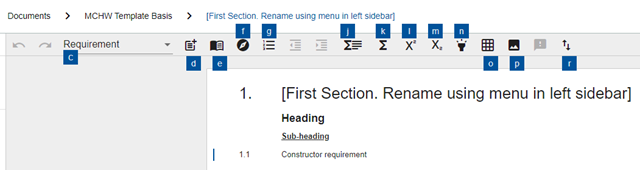
- Shortcut keys have been added for inserting Standards Format Requirements (SFRs) and Specifier Instructions (SI) – only applicable for MCHW documents. Shortcut keys can be accessed by holding down ‘Alt’. You can then press the letter key for the corresponding features you wish to access via the keyboard. For example: holding ‘Alt’, then pressing ‘E’, and then ‘E’ will open the Specifier Instructions insert modal.
- Pressing ‘Tab’ whilst on a clause within the authoring pad used to cycle through the different clause types available. Use of the Tab key in this way stopped its standard behaviour of cycling through controls on the screen; this is not in line with best practice accessibility guidelines. This feature has therefore been removed and the Tab key can be used to navigate between controls on the screen.
Bug fixes
- Pasting ‘non-breaking spaces’ into the authoring pad – Excel and Word can sometime use special ‘non-breaking’ space characters. These characters when pasted into CARS were not being picked up by validation and were occasionally causing layout issues. This bug has been fixed – the system will now automatically replace non-breaking spaces with normal space characters.
21st January 2022 – Release 3.20
Bug fixes
- Creation of ranges within the Change Log – when authoring MCHW documents and attempting to map new clauses to the previous series document in the Change Log, authors were encountering errors upon selecting read only segments of Standard Format Requirements and Specifier Instructions. This bug has now been fixed. Please note that selecting any portion of a Standard Format Requirement or Specifier Clause will result in the entire clause being highlighted as a range to be mapped to the old series document.
- Issues generating a Document Health Check – the Document Health Check was failing to generate in specific scenarios following a previous update. This bug has now been fixed.
13st January 2022 – Release 3.19
New features
- Clause Change Summary enhancements (and bug fixes) – The Clause Change Summary is a key component of the Standards Governance Process for document updates. The following enhancements and bugs fixes have now been incorporated:
- A key to the colouring used for marking up changes has been added to the top of the screen: green for additions; red for deletions and blue for re-ordering.
- Changes to section titles are now clearly marked up
- Figures are now included in PDF exports
- Guidance has been added on how to maximise the value of a PDF export (i.e. export as Landscape on A3 paper size)
- The formatting of deleted document references has been improved
Full guidance on how to use Clause Change Summary is provided within the CARS Help pages.
- Confirmation on deleting content with background commentary and/or discussions – background commentary and discussions provide authors with a clear history and audit trail of the development of the document. Previously, this valuable information could easily be lost as part of reauthoring an entire clause if the entire entity was inadvertently deleted rather than just its content. This new feature with prompt the author for confirmation when deleting content that has background commentary and/or discussions. An example of the prompt displayed is shown below:

- Background commentary enhancements (and bug fixes) – Missing background commentary is highlighted as part of the Document Health Check. The recent deploy makes the following changes:
- Health check warnings are now broken down into two categories: errors where normative clauses are missing background commentary; and warnings where appendix clauses are missing background commentary.
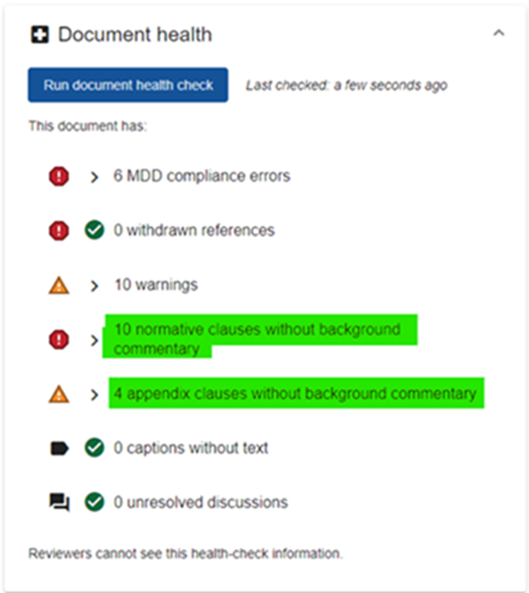
- Bug fix: warnings were being shown for clauses missing background commentary which have not been updated since the last publication. This bug has now been fixed and warnings are only shown for clauses that have been changed.
Bug fixes
- Loading image on adding discussion comment never disappears – when adding a comment to an existing discussion, the loading image whilst the comment is being saved would never disappear. This bug has been fixed.
- Deleting clauses could change the clause type of the following clause – when deleting a clause, the following clause in some circumstances was having its clause type changed to that of the deleted clause instead of correctly retaining its own clause type. This bug has now been fixed.
2nd December 2021 – Release 3.17
(Including hotfix Release 3.18 on 3rd December 2021)
(Please note that Release 3.16 related to the Departure Approval System only)
New features
- Enhanced discussions – previously, discussions could only be raised against an entire clause. Responding to feedback received, CARS has updated to facilitate discussions against clause sub-content; figures, equations and tables. A new ‘Manage discussions for‘ selector has been added to the top of the Discussions side pane – this selector is automatically set based on the currently selected content within the authoring pane. Discussions can also now be raised against individual table cells and at a section level.
All existing discussions are unaffected and will remain associated with the clause.
Please see the updated help page content on Discussions for more information on how to use this new functionality.

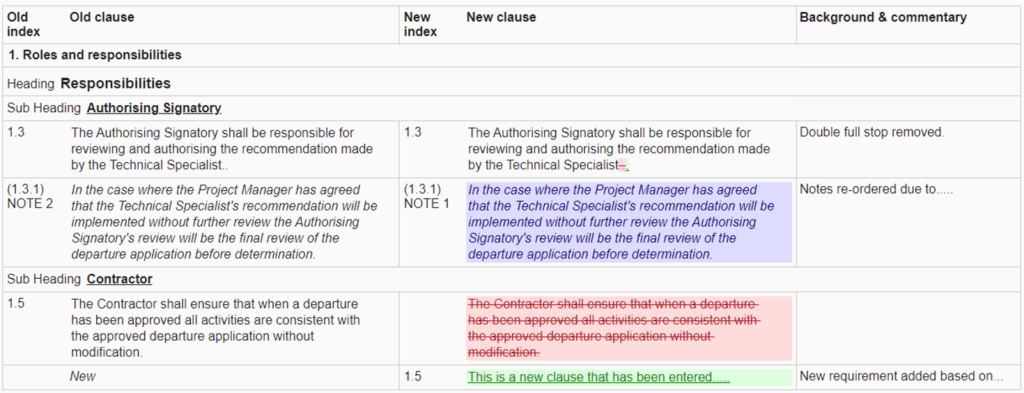
- Clause Change Summary mark up – the Clause Change Summary is a key deliverable in the Standards Governance process for document updates. Feedback was received stating that it could be hard to identify where the changes had been made, particularly with longer clauses. In response to this feedback, the Clause Change Summary has been enhanced to include ‘mark-up’, clearly highlighting the changes made to the updated clauses.
For more information on the Clause Change Summary and an overview of the different mark-up styles, please see this help page.
Bug fixes
- Section re-indexing upon reordering – it was reported that sections were not being re-indexed correctly upon reordering if the drag and drop was performed with a specific motion. Reloading the page would resolve this issue and PDF exports were not affected; the issue only affected the document authoring view. The bug has now been fixed.
- Section references within the same document – when adding a section reference from within the same document, sections available for selection were reflecting the last published version of the document rather than live content. This was incorrectly requiring a publication to be able to update references. The system has now been updated so that the sections listed for the same document always reflect the live document content.
- Equation help modal – the help button provided alongside equations was loading a modal with muddled content. This help button has now been updated to open the help page provided within this site relating to authoring equations.
- Printing the Clause Change Summary – when attempting to print the clause change summary for a previous version (i.e. generating the summary via the Version Information menu) a ‘page not found’ error message was being returned. This bug has now been fixed.
- Section compare view – The dropdowns provided to select versions to compare were not allowing selection of a newer version once an older version had been selected. The section compare view was also provided some inconsistent results in limited circumstances. These bugs have now been fixed.
13th October 2021 – Release 3.15
Bug fixes
- Following Release 3.14, the automatically generated Normative References section was listing references in a non-sequential order. This bug has now been fixed.
12th October 2021 – Release 3.14
New features
- Section references – This new feature is available for the MCHW document suite only. ‘Section references’ are used to reference a section within either the same or another MCHW document. The reference created is ‘linked’ to the target section; enabling automated updates of the referenced section index, title, and document code if they are modified. Validation errors are also provided if the target section is deleted. Section references can be added to your document using new standard format requirements provided.
Please note that discussions with the Technical Author(s) of the referenced document(s) should be undertaken to ensure that requirements are grouped in such a way that they can be referenced.
Full guidance on how to use section references is provided with in the CARS Help pages.
28th September 2021 – Release 3.13
New features
- New ‘Unrestricted’ document suite – This new document suite allows CARS to be used without the application of DMRB or MCHW specific MDD rules. It is designed to allow owners of other document suites to trial using CARS. Please contact the Technical Standards Group (TSG) via Standards_Enquiries@nationalhighways.co.uk.
14th September 2021 – Release 3.12
New features
- National Highways re-brand – Logos and text references to Highways England have been updated to reflect the new National Highways branding.
Bug fixes
- Document references within standard format requirements (SFRs) were not being correctly deleted from the automatically generated Normative or Informative References page if the SFR was deleted. This bug has now been fixed.
25th August 2021 – Release 3.11
New features
- Review status – Since January 2020, reviewers have been able to set the status of their review for document versions on their ‘My Discussions’ dashboard; the status is visible to the Lead Authors in their ‘My Documents’ dashboard so they can track progress of reviews. To make it easier to use this functionality, the ability to change the review status has now been incorporated into the ‘Version Information’ page. Reviewers can simply click the new button provided to move the review through its lifecycle stages: Not Started > In Progress > Complete ( > In Progress … ). Read more about review statuses.
Please note – this functionality is only visible to reviewers on the Version Information page within CARS.

- Confirmation when removing yourself from a CARS document – Authors will now be prompted for confirmation when attempting to remove their own access from a document; ensuring that they do not inadvertently lock themselves out of a document in error. Read more about user roles and permissions by clicking this link.
- (MCHW documents only) Default clause text within a Nationally Determined Section – when adding a Nationally Determined Section to a MCHW document, each automatically generated section for the four overseeing organisations will now include a default clause: “No nationally determined section is provided.”
Bug fixes
- (MCHW documents only) Document and verification clause linkage issues fixed – following a recent update to the standard format requirements (SFRs) available within MCHW documents, not all of the documentation and verification SFRs were available for selection within the clause linkage functionality. This bug has now been fixed.
20th January 2020
A CARS update has been released! New features include…

… set your review status in the My Discussions dashboard
The My Discussions dashboard provides an overview of all the discussions and comments that you have raised. Following your feedback, we have enhanced the dashboard with new functionality to allow reviewers to set the status of their review for each document. The review status can be set to in progress, completed, or reopened. The review status is then displayed to the Document Owner and Lead Authors in the My Documents dashboard. This helps answer questions like “Have I completed a review on the latest version of this document?”, and to lets reviewers easily communicate the status of their review with the Document Owner. This is useful to make Document Owners aware you have submitted a review, or that a review is still in progress and so more discussions may continue to be raised. To learn more, please watch this video.

… view the review statuses for a document in the My Documents dashboard
The My Documents dashboard provides an overview of all the discussions on documents where you are the Document Owner or Lead Author. Following your feedback, the dashboard now displays the review status for each reviewer on each document. This status is set to in progress, completed, or reopened by the reviewer in the My Discussions dashboard. This can be used to help answer questions like “Are all the reviews completed on the latest version of my document?”, “Has a review been completed for every NAA?”, and “Has a reviewer completed their review before I respond to their comments?”. To learn more, please watch this video.
A number of fixes have been implemented, including …

… resolving a related to deleted references
We have a resolved a bug that was causing deleted references to be shown in the live document when they were only present in previous document versions.
Icons included were designed by Freepik, Pixel Perfect from Flaticon is licensed by CC 3.0 BY
Back to top25th October 2019
A CARS update has been released! New features include…

… the My Discussions dashboard
Following your feedback, we have created a new dashboard that provides an overview of all the discussions and comments that you have raised. It lets you easily review all of your discussions and comments on documents and versions that you are assigned to. It can be used to help answer questions like “Have all my discussions and comments been resolved?” and “What were the discussions I raised on the previous version?”. To learn more about this dashboard, watch the YouTube tutorial here.
… the My Documents dashboard
Following your feedback, we have created a new dashboard that provides an overview of all the discussions on documents where you are the Document Owner or Lead Author. It can be used to help answer questions like “Which discussions are open, which have been responded to, and which are resolved?” and “What is an overview of the discussions that each reviewer has raised?”. To learn more about this dashboard, watch the YouTube tutorial here.

… locking on the document information page
The fields on the Document Information page are now locked for editing by a single user. This means that users work cannot be overwritten by another user editing the same information at the same time.

… update to the CARS log-in page
The CARS log-in page has been updated to use a new release from our authentication technology provider. The log-in page has a different layout, but works in exactly the same way with your existing username and password.
A number of fixes have been implemented, including …
… resolving a bug that caused reference to have inconsistent numbering and display as question marks
A bug existed that caused references to appear with inconsistent numbering between the document content and the references sections. Additionally, some references did not load and showed as question marks. Both of these issues have been resolved.

… allowing users to scroll in the full Background & Commentary view
Previously users were unable to scroll in the full Background & Commentary view. This has been resolved and a scrollbar is now available.
Icons included were designed by Freepik, SmashIcons from Flaticon is licensed by CC 3.0 BY
Back to top4th September 2019
A CARS update has been released! New features include…
… the management of withdrawn references in CARS
To ensure that a consistent set of references are used throughout the DMRB, TSG now manage withdrawn references and their superseding documents in CARS. Users are shown validation errors in the Document Healthcheck and the sidebar if a withdrawn reference is used in their document. If a user adds a withdrawn reference, they are warned that it has been withdrawn and provided the list of superseding documents. To learn more, watch the YouTube tutorial here.
For TSG users, please watch the YouTube tutorial on how to withdrawn references here.

… users can now copy and paste between CARS documents, including tables, images and equations
Users can now copy and paste content between CARS documents. This maintains the formatting of the content, including clause types, lists and references. Tables, images and equations can be copied and pasted. There is a new ‘copy’ button available for tables, images and equations which allows you to copy this individual item. To learn more, watch the YouTube tutorial here.

… the pagination of the whole Change Log view
The whole Change Log view has been paginated to show a selected number of rows per page. This significantly improves load times and ensures that the Change Log loads for large documents. Users can change the number of rows displayed on each page, and can navigate through all pages of the Change Log. To learn more, watch the YouTube tutorial here.

… the full Section name is shown on hover
The full Section name is now shown when you hover your mouse over the section title. This is helpful for sections that have long titles or begin with the same text, for example “Appendix …”
A number of fixes have been implemented, including …

… resolving a bug that caused the Section to scroll to the top when “Resolve and Accept” was pressed on a discussion
A bug was causing CARS to scroll to the top of the Section when a user pressed “Resolve and Accept” on a discussion. This has been fixed and no longer occurs.

… displaying the year within timestamps used in CARS
Previously, all timestamps only showed the day and month. This has been updated to also show the year. Timestamps can be seen in discussions, comments, and versions.

… resolving a bug that incorrectly stated “Resolved by:” before all comments on discussions
Previously, all comments on discussions were preceded with the text “Resolved by:”. This issue has been fixed so that this is only shown when a comment resolves a discussion.

… updating the Welsh Government email address in the NAA PDF output
The email address for Welsh Government has been updated in the Welsh NAA PDF output.
Icons included were designed by Freepik, Google, SmashIcons from Flaticon is licensed by CC 3.0 BY
Back to top18th July 2019
A CARS update has been released! New features include…

… a new help page for CARS!
A new help page has been released, which contains updated help content and materials. Access it by clicking ‘Help Pages’ in the CARS header banner. This also resolves all log-in issues with the previous help page. Please request any additional help content via iig_cars@caci.co.uk
… users cannot edit document after they have been approved at Technical Project Board
CARS documents can no longer be edited after approval at Technical Project Board. This new functionality ensures that documents are not corrupted during publication checks.
After TPB approval, all users authoring rights are removed and the document becomes read-only. TSG are able to reassign authoring permissions to specific users if edits are required as part of the final approval checks. To learn more, watch the YouTube tutorial here

… improvements to the Change Log ‘view link’ popup
Following user feedback, the Change Log ‘view link’ popup now includes which section that contains the link text. You can now easily locate text when reviewing the Change Log.

… a new Service Outage page is shown if CARS is unavailable
If CARS is unavailable, a Service Outage page is displayed and provides information to users.
… the ‘references’ sections has been renamed to have a lower case ‘r’
The Normative and Information reference sections were named with a capital ‘R’. Following user feedback, this has been updated to a lower case ‘r’ so that it is consistent across the document.

… TSG can export PDFs with missing Document Information
Previously TSG could not export PDF’s that had missing information in the Document Information. TSG can now export a PDF when this occurs, which also allows PDFs to be exported for versions that have missing data. There is an export warning provided, and warning text is stated in the PDF. These fields must be completed for publication.
A number of bug fixes have been implemented, including …

… images are centre aligned in the PDF output
Images are centre aligned in the PDF output. This is consistent with how images are displayed in the CARS pad.
… when a section is opened, the scroll returns to the top of the section
Previously, when a user opened a section in a document, it did not navigate to the top of the section. This has been fixed and the scroll now returns to the top of the section.

… resolving a bug that caused CARS to respond slowly when zoomed in
A bug was causing CARS to perform very slowly when zoomed in. This has been fixed and no longer occurs.
Icons included were designed by Freepik, Those Icons, Smashicons and SimpleIcon from Flaticon is licensed by CC 3.0 BY
Back to top14th May 2019
A CARS update has been released! New features include…

… a warning notification if a document contains a large table that may be distorted when exported to PDF
If a document contains a large table that may be distorted during PDF publication, a warning notification is thrown when this document is exported to PDF. The warning is shown in the ‘Notifications’ area, and states which table is affected.

… TSG users have full authoring permissions on all documents
As admin users, TSG now have full authoring permissions on all documents in CARS. TSG will no longer need to assign themselves as authors to a document to make changes.

… equations captions are included in PDF export
Following feedback, we have included the equations captions in PDF export.

… technical improvements to the Change Log export functionality
Technical improvements have been made to the functionality to create the Change Log Grid. This will improve the performance and stability of this feature. This work also provides the foundations for future development work, including creating the functionality to export the Change Log to Excel
A number of bug fixes have been implemented, including …

… subscript and superscript text are displayed correctly in the PDF contents table
Subscript and superscript text are now displayed correctly in the PDF contents table. This item resolves feedback raised regarding the publication of document CD 523.

… symbol tables have the correct caption numbers in the PDF
When a symbol table is included for an equation, this fix ensures that the table number is exported correctly to PDF. This item resolves feedback raised regarding the publication of document BD 36.

… ensure that figures within table cells are exported correctly to PDF
An issue was raised that a large figure within a table cell was overlapping other cells of the table. We have resolved this item, which was raised regarding the publication of document BD 44.

… ‘Clause begins with an empty space’ is no longer shown for clauses beginning with an equation or reference
The Document Healthcheck displayed a warning ‘Clause begins with an empty space’ for clauses beginning with an equation or reference. This has been updated, and the warning will no longer show in this scenario.

… the symbol table icon is displayed correctly
A bug that distorted the icon to insert a symbol table for an equation has been fixed.
Icons made by Dave Gandy , Smashicons , Freepik , Alessio Atzeni from www.flaticon.com is licensed by CC 3.0 BY
Back to top