
Contents
Introduction
You can easily manage your personal information, and control which information other people see and apps may access, using the link provided below.
https://id.atlassian.com/manage-profile/profile-and-visibility
Required information
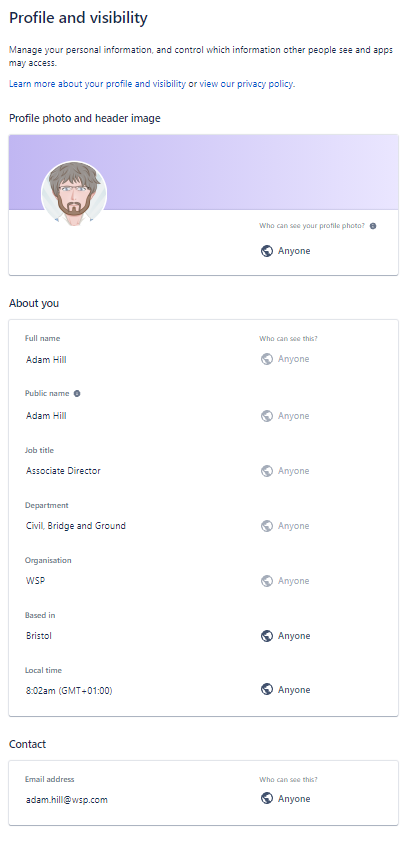
To make it as clear as possible to identify who current actions reside with within the Standards Governance Process, we ask that you update your Full name and Public name.
Clicking on the Profile photo will give you options of:
- Change profile photo
- Create initials avatar (where you can enter up to 4 characters, including emojis using the Windows button + ‘;’)
- Remove
You do not need to provide a profile photo/image if you do not wish to. If you do not wish to, please ensure that the initials avatar shown your preferred initials.
Job title, Department, Organisation and Based in are all optional – although this can be very helpful to identify where Technical Authors reside within National Highways’ supply chain.
Your Email address is linked to your Atlassian (Jira’s vendor) account. Please note that only company email addresses should be used within the National Highways Jira instance.
Back to topSetting the visibility of your email address
By default, the Who can see this? option is set to Only you and admins. Since Jira is being used for business purposes and only Atlassian accounts with business emails should be used, we ask that this option be set to Anyone.
Why is this important?
There are two main reasons why we ask that you make your email address visible in Jira:
- To help the Technical Standards Group (TSG) easily contact all Jira users if they are making changes to the system; or if they have questions regarding items that your are the current assignee on.
- The linkage between CARS and Jira relies on matching email addresses between Jira and CARS user accounts. If the visibility of the email address is not set then CARS cannot read the email address and hence cannot match users. This means that the Technical Author name will not be shown on document listing and sections reference document searches.